World Explorer

The whole planet,
one tap away.

How this is made →

Erask turns Earth into a living atlas. Spin a real 3D globe, drop a base anywhere — a Roman ruin, a volcano, a battlefield — and instantly discover every remarkable place around it. Then press play on a Story and watch history unfold across the map — or write one yourself, on any subject, with the help of your favourite AI.

90+place categories
18curated stories
2in the making
places to discover
scroll
The Globe

A real Earth,
rendered like a jewel.

Not a flat map. A hand-crafted 3D globe with GPU-shaded mountain relief from NASA elevation data, precise vector coastlines, thousands of islands and cities that fade in as you fly closer.

3D mountain relief

Real elevation, shaded in real time on the GPU. The Alps, the Andes and the Himalaya cast their ridges across the sphere.

Drop a base anywhere

One tap on “Explore here” scans the area through Wikidata and reveals every notable place around your point — instantly.

90+ categories of places

Castles, cathedrals, volcanoes, glaciers, beaches, historical battles, sieges and expeditions. If it mattered, it’s on the globe.

Photos & stories built in

Every place opens a gallery from Wikimedia Commons and the full article on Wikipedia, with the photographs and the text that go with it.

Curated stories

Hand-built timelines that play out on the globe, each one researched against its sources — and every event links to the article behind it.
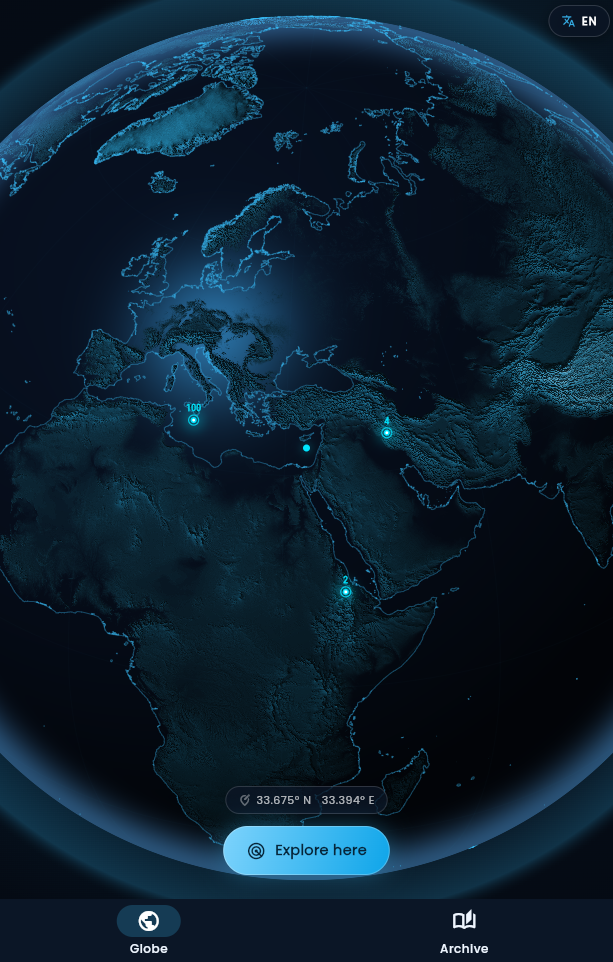
Erask — the 3D globe with a base dropped
Stories

History, playing out
on the globe.

Press play and watch it happen. Armies advance, borders shift, a merchant crosses Asia, a century of detonations lights up the map — every event pinned to the place and the day it happened, with the Wikipedia article one tap away.

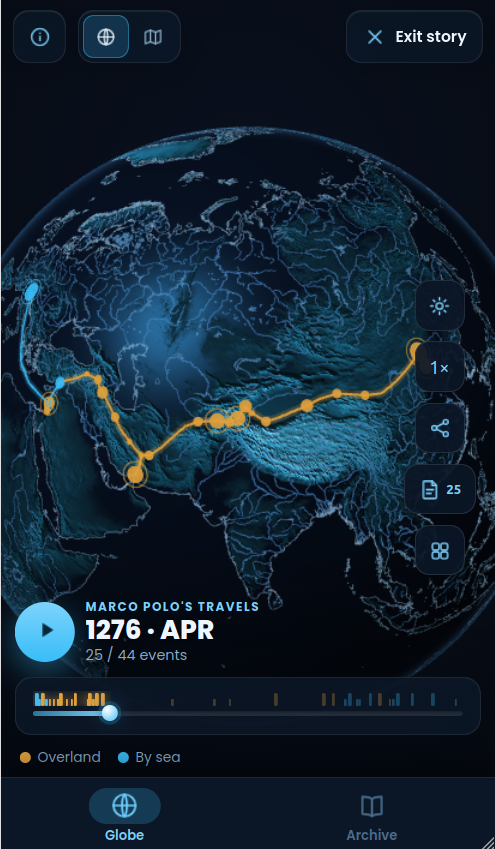
Erask — Marco Polo’s route drawing itself across Asia in Story mode
A timeline you drive

Scrub through the years, pause on a turning point, or run it at 1× to 8×. The date on screen is the date on the globe.

Routes that draw themselves

Journeys trace their path leg by leg, a moving point at the head of the line — twenty-four years of Marco Polo in under a minute.

Territories that shift

Fronts and empires are painted as they were on that day, each faction in its own colour, fading from one snapshot to the next as the war moves.

Every event is an article

Battles, sieges, landfalls and tests appear as markers sized by scale. Tap one and Wikipedia opens on that exact moment in history.

See all 18 stories → · 2 more in the making

Write your own NEW

Any subject you like,
on the same globe.

Our stories are hand-built, one at a time — yours doesn’t have to be. Copy one prompt into ChatGPT, Claude, Gemini or whatever model you use, say what it should be about, and it answers with a link: up to fifty events appearing in place and in order. No account, nothing uploaded — the whole story travels inside the link.

It is a simpler kind of story than the ones above: events appearing on the map, without the shifting territories and the routes that draw themselves. Those are drawn by hand, one snapshot at a time.

A story about the Silk Road Copy the prompt
01

Name the subject

The history of coffee, your city, the Space Race, one summer of one war. Your subject is written into the prompt for you — one button and it is on the clipboard.

02

Any model does the work

It chooses the events, looks each one up on Wikidata for its place and its date, and assembles the link — then tells you what it had to leave out.

03

The link is the story

Nothing is stored on a server: everything is in the address. Send it to someone and you have sent them the story — it plays for them exactly as it played for you.

The Archive

Everything you find,
beautifully organized.

Every place you uncover flows into your personal Archive — no manual filing, ever. Three living views of your journey around the world.

Categories

Expandable groups for every kind of place you’ve found. A site that is both a castle and a museum shows up in both — automatically.

Favorites

Star any article to pin it. Your shortlist survives even if you clear the base it came from.

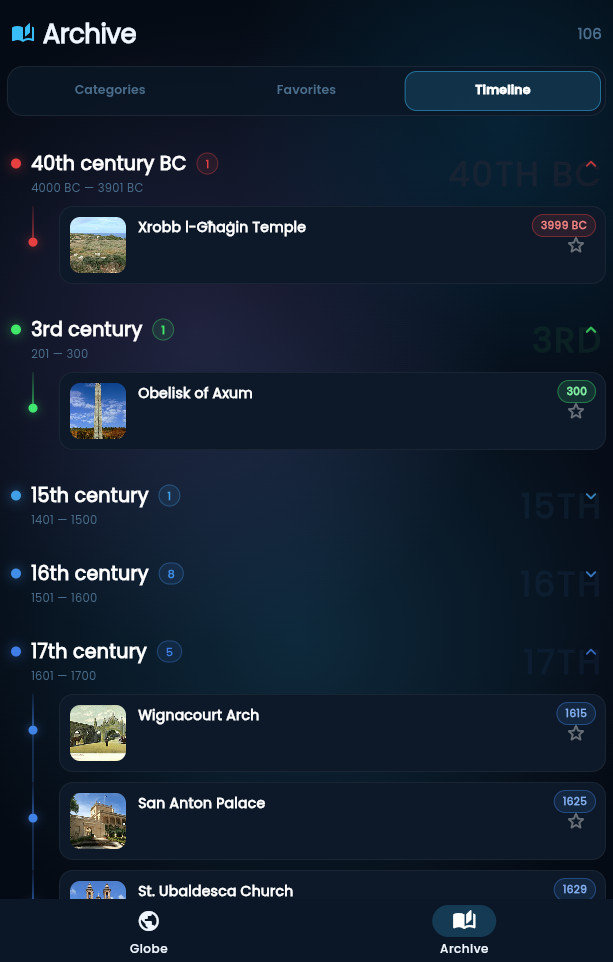
A timeline through the centuries

Your discoveries arranged by century — from the 5th century BC to today — along a glowing timeline, each era with its own color. Foundation dates are fetched from Wikidata automatically.

Back to the globe

Any article can point back to its exact spot: one tap and the globe flies you there.

Erask — the Archive timeline through the centuries
How it works

Three taps to anywhere.

01

Spin the globe

Drag, pinch, dive. From orbit down to a single valley, with mountain relief, coastlines and cities emerging as you approach.

02

Drop a base

Center any point on Earth and tap Explore here. Erask queries the open knowledge graph and lights up every remarkable place around it.

03

Explore & collect

Browse places grouped by category, open photo galleries, read the stories — and watch your Archive and timeline grow.

Install

Add Erask to your home screen.

Erask is a Progressive Web App — no app store, no download. It runs right in your browser; installing simply adds an icon and lets it open full-screen and work offline.

AndroidChrome
  1. Open Erask in Chrome.
  2. Tap the ⋮ menu (or the “Install” banner that appears).
  3. Choose Install app — it lands on your home screen.
iPhone & iPadSafari
  1. Open Erask in Safari.
  2. Tap the Share button (the square with an up-arrow).
  3. Scroll and choose Add to Home Screen.
DesktopChrome / Edge
  1. Open Erask in Chrome or Edge.
  2. Click the install icon in the address bar.
  3. Click Install — it opens in its own window.
Prefer not to install? Just tap Open Erask and use it straight in the browser — everything works the same. Your bases and favorites are saved on your device either way.
Open knowledge

Powered by the world’s greatest library.

Every article, photo and date in Erask comes from Wikipedia, Wikidata and Wikimedia Commons — the free knowledge projects built by millions of volunteers. Read the full credits →

Wikipedia Wikidata Wikimedia Commons Natural Earth NASA SRTM
No account

No sign-up, no login. Open the app and explore.

No tracking

No ads, no analytics, no third-party trackers.

Yours, on device

Bases, favorites and settings live only on your phone. Privacy policy →

Erask · World Explorer

Your next discovery is
already on the globe.

Free, lightweight, and endlessly curious — just like you. No store, no sign-up.

Open Erask
or add it to your home screen ↑