Interactive history map

History happened
somewhere, and all at once.

How this is made →

An article tells you one thing at a time. It never tells you what was around it, or what else was going on that year. Erask does both: pick a year and watch the whole world in it, or open a place and follow it to everything it touches — on a real 3D globe, out of Wikipedia, with nothing to sign up for.

91kdated things
22curated stories
1in the making
4000 BCwhere it starts
scroll
Why it exists

Two things an article
never tells you.

01 What was around it

You read about Krakatoa. The article mentions the Sunda Strait, the island of Panaitan the wave emptied, and Rodrigues — nearly five thousand kilometres away, in the section about how far the sound carried. They stay words in a paragraph. Draw a shape around the strait and they become a list with dates on it: everything that place has been through, in order, from the eruption to the island that rose back out of the sea forty years later.

See how →
02 What else was going on

You read about Waterloo, June 1815. In the same year the Congress of Vienna was redrawing Europe, and Mount Tambora had just erupted — the eruption that took the summer away. Nothing connects them except the year, and that turns out to be enough.

See how →

Wikipedia knows where everything is, and it knows when everything happened. It just never shows you both at once — and it can only answer for places somebody wrote an article about. A shape you draw yourself has no article.

What you can do

Three ways in.

One starts from time, one from place, one from a subject. All three end on the same globe.

Or read history one year at a time: 480 BC · 218 BC · 1066 · 1492 · 1815 · 1914 · 1969 · every year →

Stories

History, playing out
on the globe.

A story is a chosen path through Wikipedia. Press play and dozens of places light up in the order it happened — a legion moving north, a merchant crossing Asia, a century of detonations — each one a tap away from the article that tells it. Chosen by hand, and every date and place checked before it ships.
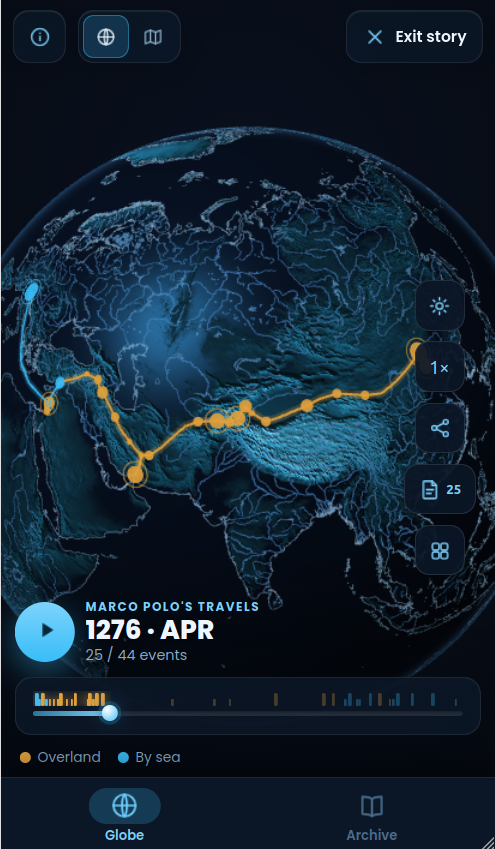
Erask — Marco Polo’s route drawing itself across Asia in Story mode
A timeline you drive

Scrub through the years, pause on a turning point, or run it at 1× to 8×. The date on screen is the date on the globe.

Routes that draw themselves

Journeys trace their path leg by leg, a moving point at the head of the line — twenty-four years of Marco Polo in under a minute.

Chosen, then checked

Dozens of moments picked out of thousands, and every date and place verified against a table decided in advance — by a generator that refuses to publish when the check fails.

Every event is an article

Battles, sieges, landfalls and tests appear as markers sized by scale. Tap one and Wikipedia opens on that exact moment in history.

See all 22 stories → · 1 more in the making
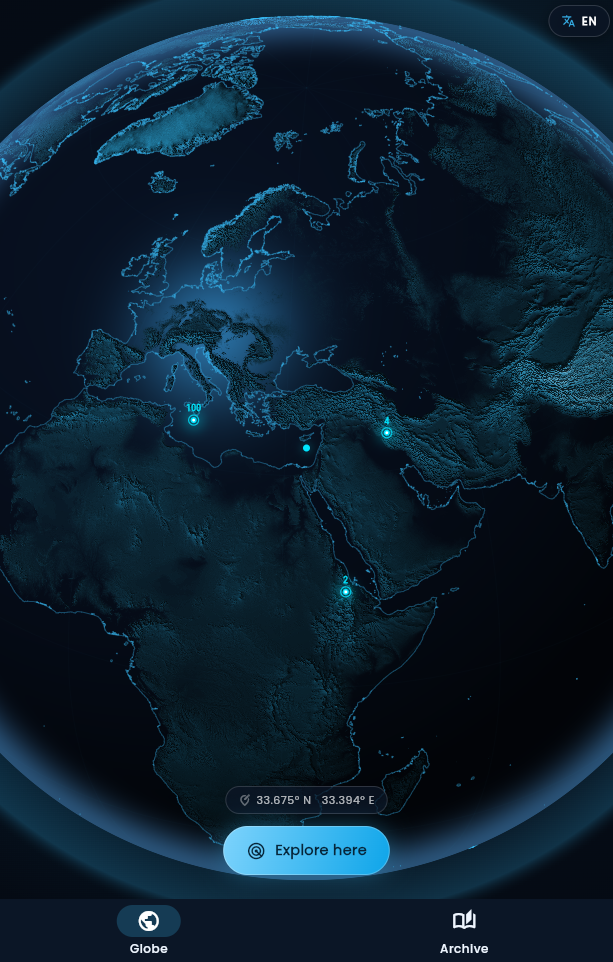
The Globe

A real Earth,
rendered like a jewel.

Not a flat map. A 3D globe dressed in NASA’s Blue Marble photograph, with mountain relief lit in real time, an atmosphere at its edge, and city names that appear as you fly closer. Draw on it to read a place’s whole history, or move the ruler to see a single year everywhere at once.

3D mountain relief

Real elevation, shaded in real time on the GPU. The Alps, the Andes and the Himalaya cast their ridges across the sphere.

Draw an area

Draw any shape on the globe and Erask returns everything dated inside it, in order — and everything those things reference, wherever it happened. From a local index, so the answer arrives in a few hundredths of a second and nothing is asked of anyone.

45 categories, two kinds

Things that happened — battles, sieges, treaties, earthquakes, shipwrecks — and the year things were built: castles, towers, bridges, universities. Forty-eight thousand of the first, forty-two thousand of the second.

Every point is an article

Tap any point for its photograph, its dates and a short summary, then open the full article on Wikipedia.

Read it by family

A battle sits under its war, the war under its empire. The list of an area opens that way — the Second Punic War as one line with Cannae and Trasimene inside — and every entry can open what it references, in place. See the whole family tree as a graph →

Curated stories

Hand-built timelines that play out on the globe, each one researched against its sources — and every event links to the article behind it.

Erask — the interactive 3D history globe
Install

Add Erask to your home screen.

Erask is a Progressive Web App — no app store, no download. It runs right in your browser; installing simply adds an icon and lets it open full-screen and work offline.

AndroidChrome
  1. Open Erask in Chrome.
  2. Tap the ⋮ menu (or the “Install” banner that appears).
  3. Choose Install app — it lands on your home screen.
iPhone & iPadSafari
  1. Open Erask in Safari.
  2. Tap the Share button (the square with an up-arrow).
  3. Scroll and choose Add to Home Screen.
DesktopChrome / Edge
  1. Open Erask in Chrome or Edge.
  2. Click the install icon in the address bar.
  3. Click Install — it opens in its own window.
Prefer not to install? Just tap Open Erask and use it straight in the browser — everything works the same. Anything you save stays on your device either way.
Open knowledge

Powered by the world’s greatest library.

Every article, photo and date in Erask comes from Wikipedia, Wikidata and Wikimedia Commons — the free knowledge projects built by millions of volunteers. Read the full credits →

Wikipedia Wikidata Wikimedia Commons Natural Earth NASA SRTM
No account

No sign-up, no login. Open the app and explore.

No tracking

No ads, no analytics, no third-party trackers.

Yours, on device

Saved stories and settings stay in your browser. Fonts and data come from erask.org itself. Privacy policy →

Questions

What people ask first.

What is Erask?

Erask is a free interactive history map: a 3D globe with ninety thousand dated events and foundations from 4000 BC to today, built from Wikipedia and Wikidata. You can pick a year and see what happened around the world, draw any area and read its whole history in order, or watch curated stories play out on the globe.

How do I see what happened in a given year?

Open the globe and move the time ruler at the bottom, or type the year. Every event that touches that year appears at once — what began, what ended and what was still under way. Each year also has its own page, listed under Year by year.

Can I see the history of one place?

Yes. Press Draw area and trace any shape on the globe — a country, a valley, the sea between two islands. Erask lists everything dated inside it, grouped by what it belongs to (a battle under its war), or in one column by year.

What are the stories?

Stories are animated history maps: dozens of events lighting up on the globe in the order they happened, such as Caesar's Gallic Wars, Marco Polo's travels or every nuclear test from 1945 to 1998. The curated ones are researched and checked against their sources before they are published.

Can I make my own history map?

Yes, in two ways: build one by hand in the story editor, adding Wikipedia articles, or copy a prompt into ChatGPT, Claude or Gemini and get a story back as a link. Either way the whole story travels inside the link, with no account.

Is Erask free? Do I need an account?

Erask is free, has no account, no ads and no analytics, and runs in any modern browser. It can also be installed to the home screen as an app and works offline once visited.

Erask

Your next discovery is
already on the globe.

Pick a year, draw a place, press play. Free, no store, no sign-up.

Open Erask
or add it to your home screen ↑